Industrial handheld computers are commonly used in warehouses, logistics, retail, inventory management, and field operations. Because these devices are often used throughout a working shift, dependable battery performance is essential.
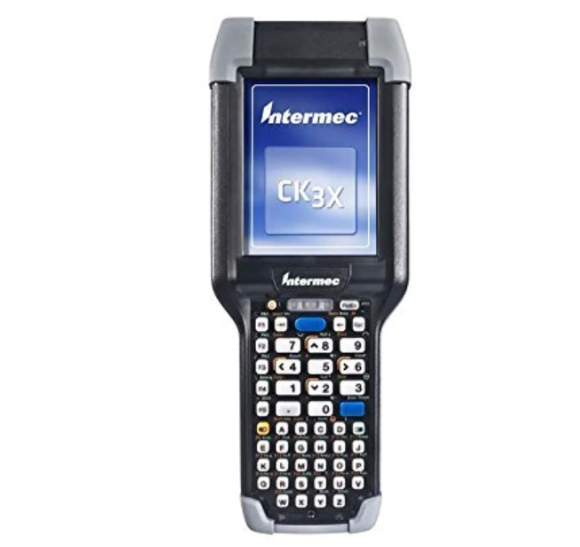
If your Intermec CK3 or CK3X is no longer providing enough runtime, refuses to charge, or unexpectedly shuts down, the battery may have reached the end of its service life. The 318-034-034 replacement battery with a 5.0Ah / 18Wh capacity offers a replacement option for compatible CK3-series devices using AB18 or AB17 battery references.
This guide explains common battery problems, how to identify possible battery failure, and the situations where replacing the battery can help restore reliable operation.
Why Does the Intermec CK3X Battery Drain So Quickly?
Short battery life is one of the most common signs of an aging battery. In busy warehouse and logistics environments, a handheld computer may be used continuously for scanning, data entry, wireless communication, and inventory operations.
A battery that has degraded over time may no longer provide enough capacity to support a full working shift.
Common causes of short battery life include:
- Natural battery aging
- Frequent charging and discharging
- Intensive barcode scanning
- Continuous Wi-Fi or wireless communication
- High screen brightness
- Long periods of active use
- Exposure to extreme temperatures
- Battery capacity degradation
If the CK3X previously operated throughout most of a shift but now requires charging much earlier, the battery may have lost a significant amount of usable capacity.
Intermec CK3 Battery Not Charging
Another common issue is when the Intermec CK3 or CK3X battery does not charge properly.
Before replacing the battery, check the charging cradle, charging cable, power adapter, and battery contacts. Dirty or oxidized contacts can sometimes prevent a stable charging connection.
Possible charging-related symptoms include:
- Battery percentage does not increase
- Charging stops unexpectedly
- Charging takes much longer than before
- Battery level drops quickly after charging
- Device shuts down shortly after being removed from the charger
- The handheld computer only works reliably while connected to external power
If the charging accessories and contacts are functioning correctly but the battery still cannot maintain a charge, the battery may require replacement.
How to Tell If the 318-034-034 Battery Is Damaged
A charging problem does not always mean that the battery itself is defective. The charging cradle, contacts, power adapter, or device hardware can also cause similar symptoms.
Consider the following signs.
1. Battery Runtime Has Become Much Shorter
Fully charge the CK3 or CK3X and use it under normal working conditions. If the device’s operating time has decreased substantially compared with its previous performance, the battery may have degraded.
For warehouse employees, a battery that once lasted through a complete shift but now requires midday charging is a clear reason to investigate battery condition.
2. Unexpected Shutdowns
If the handheld computer suddenly shuts down during normal operation, especially while scanning or transmitting data, the battery may no longer be able to provide stable power.
Unexpected shutdowns can also have other causes, so additional diagnostics may be necessary.
3. Battery Percentage Drops Quickly
A battery indicator that falls unusually quickly during ordinary use can indicate reduced capacity.
For example, the device may show a relatively high battery level shortly after charging but then lose power much faster than expected.
4. Charging Problems Persist
If the battery repeatedly refuses to charge after checking the charger and battery contacts, it may have reached the end of its useful service life.
5. Physical Battery Damage
Inspect the battery for swelling, cracks, leakage, deformation, or unusual heat. A damaged lithium-ion battery should not continue to be used.
Do not puncture, bend, open, or attempt to repair a damaged battery yourself. Follow appropriate workplace battery-handling and disposal procedures.
When Should You Replace an Intermec CK3X Battery?
A 318-034-034 replacement battery may be worth considering when the CK3 or CK3X itself continues to work properly but the original battery has become unreliable.
Typical replacement situations include:
- Short battery runtime
- Frequent charging during a work shift
- Battery cannot hold a charge
- Unexpected device shutdowns
- Charging problems
- Battery has been used for an extended period
- Visible battery damage
Replacing an aging battery can extend the useful life of a handheld computer and may be more practical than replacing an otherwise functional device.
Before purchasing, verify the battery model, capacity, voltage, connector, physical dimensions, and compatibility with your exact Intermec device.
5.0Ah / 18Wh Battery for Demanding Work Environments
The 5.0Ah / 18Wh battery capacity is particularly relevant for mobile work environments where users need dependable operating time.
However, actual runtime depends on many factors, including wireless communication, scanning frequency, screen usage, software, temperature, battery age, and device settings.
The same battery may therefore provide different runtime depending on how the CK3 or CK3X is being used.
Common Intermec CK3 and CK3X Usage Scenarios
Warehouse Inventory
Warehouse workers can use handheld computers to scan products, locate inventory, update stock records, and verify orders. Reliable battery performance helps reduce interruptions during long shifts.
Logistics and Shipping
Shipping and receiving departments often use mobile computers to scan packages, track shipments, verify labels, and update logistics information. A battery that lasts through the working period can improve operational efficiency.
Retail
Retail employees may use handheld devices for stock checking, barcode scanning, price verification, and inventory management. A dependable replacement battery helps keep the device ready when needed.
Distribution Centers
Large distribution centers may require employees to move continuously between storage areas and processing stations. Wireless handheld computers provide mobility, making battery reliability especially important.
Field Operations
Field workers may use rugged handheld computers away from traditional office environments. A dependable battery reduces the need to search for a charging outlet during working hours.
How to Maintain Better Battery Performance
After installing a compatible replacement battery, several maintenance practices can help support reliable performance.
Keep the device away from extreme temperatures, particularly excessive heat. Clean the battery contacts and charging contacts according to the manufacturer’s maintenance procedures.
Use compatible charging equipment and avoid damaged cables or charging accessories.
For organizations operating multiple CK3 or CK3X devices, establishing a regular battery inspection and replacement schedule can also help prevent unexpected downtime.
Verify Compatibility Before Buying
The 318-034-034 battery is specified as a 5.0Ah / 18Wh replacement battery for Intermec CK3 and CK3X systems, with AB18 and AB17 references associated with the product.
Before ordering, compare the replacement battery with the battery currently installed in your device. Check:
- Battery model or part number
- Capacity
- Voltage
- Connector
- Physical dimensions
- Battery contacts
- Device compatibility
Do not select an industrial handheld battery based only on its capacity. The battery must be physically and electrically compatible with the device.
A dependable battery is essential for industrial handheld computers because these devices are often used continuously throughout a working shift. If your Intermec CK3 or CK3X has developed short battery life, charging problems, unexpected shutdowns, or abnormal battery behavior, the battery should be included in the troubleshooting process.
The 318-034-034 5.0Ah / 18Wh replacement battery provides a replacement option for compatible Intermec CK3 and CK3X devices using AB18 or AB17 battery references.
With a properly matched replacement battery, businesses can continue using their handheld computers for warehouse inventory, logistics, retail, distribution, shipping, and field operations with fewer battery-related interruptions.
Always verify compatibility before purchasing and follow appropriate safety procedures when installing or replacing an internal or removable lithium-ion battery.