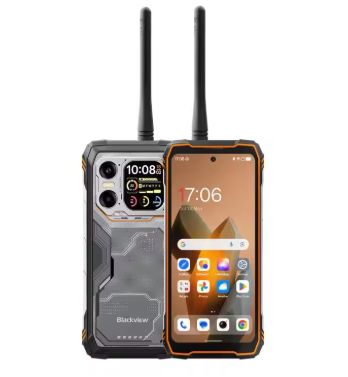
A dependable battery is essential for a smartphone used throughout the day. Whether you use your Blackview Shark 9 for calls, social media, photography, gaming, navigation, or entertainment, battery performance directly affects the overall user experience.
Over time, rechargeable batteries naturally lose capacity. A phone that once lasted comfortably through a full day may eventually require charging several times a day. Problems such as short battery life, rapid battery drain, charging difficulties, and unexpected shutdowns can all indicate that the original battery needs to be inspected.
The 5000mAh Li506482PLGY replacement battery provides a replacement option for compatible Blackview Shark 9 devices.
Why Is the Blackview Shark 9 Battery Draining Quickly?
If your Blackview Shark 9 battery no longer lasts as long as it used to, several factors may be responsible.
Battery Aging
Lithium-based rechargeable batteries gradually lose capacity after repeated charging cycles. As the battery ages, its actual usable capacity becomes lower than its original capacity.
If your phone needs to be charged much more frequently than when it was new, normal battery degradation is one possible reason.
High Screen Brightness
The display is one of the major sources of smartphone power consumption. Keeping the screen brightness at maximum for extended periods can significantly shorten battery runtime.
Reducing brightness when maximum brightness is unnecessary can help extend daily battery life.
Gaming and Video Streaming
Gaming, video streaming, video recording, and other demanding tasks require more processing power and display activity.
It is normal for battery consumption to increase during intensive workloads. However, if the battery drains unusually fast during basic tasks such as messaging or browsing, battery degradation may be worth investigating.
Background Applications
Social media applications, cloud synchronization, notifications, location services, and automatic updates can continue consuming power in the background.
Check your phone’s battery usage settings to identify applications that consume an unusually large amount of energy.
What If the Li506482PLGY Battery Cannot Be Charged?
A Blackview Shark 9 battery that will not charge does not necessarily mean that the battery itself is defective. The charger, charging cable, USB port, or internal charging circuit may also be responsible.
Check the Charger and Cable
Make sure you are using a compatible charging adapter and cable. Check the cable for visible damage and ensure that the connections are secure.
If possible, testing with another known-good compatible charger can help determine whether the problem is related to the charging accessories.
Inspect the Charging Port
Dust or debris inside the charging port can prevent the cable from making proper contact.
Inspect the port carefully and avoid using sharp metal objects that could damage the connector.
Restart the Phone
A temporary software or power-management issue can sometimes interfere with charging detection. Restarting the smartphone is a simple troubleshooting step.
Observe the Charging Percentage
If the battery percentage does not increase after an extended period, increases extremely slowly, or falls quickly immediately after disconnecting the charger, the battery may have significantly degraded.
Check for Excessive Heat
If the smartphone becomes unusually hot while charging, disconnect the charger and investigate the cause.
A swollen, leaking, or physically damaged battery should not be charged.
How to Tell If the Blackview Shark 9 Battery Is Damaged
Battery problems can sometimes be confused with software or charging issues. Look for multiple symptoms rather than relying on a single sign.
1. Extremely Short Battery Life
If the Blackview Shark 9 previously lasted most of the day but now requires charging after only a short period, the battery may have lost significant usable capacity.
2. Rapid Battery Percentage Drops
A battery indicator that falls unusually quickly during light usage can be a sign of battery degradation.
For example, if the battery percentage drops dramatically while the phone is only being used for messaging or browsing, the battery may require further inspection.
3. Unexpected Shutdowns
If the phone suddenly turns off even though the battery indicator shows remaining power, the battery may no longer be able to maintain stable output.
However, software problems and other hardware faults can cause similar symptoms, so unexpected shutdowns alone do not confirm battery failure.
4. Battery Cannot Hold a Charge
If the Blackview Shark 9 appears to charge normally but loses power very quickly after being disconnected, the battery may have reached the end of its service life.
5. Phone Only Works Properly While Charging
If the phone operates normally when connected to a charger but shuts down soon after the charger is removed, the internal battery should be inspected.
6. Physical Swelling
A swollen or deformed battery is a serious warning sign.
Do not continue using or charging a swollen, punctured, leaking, or visibly damaged lithium battery. Stop using the device and seek professional repair assistance.
Li506482PLGY Battery Specifications
| Specification | Details |
|---|---|
| Battery Model | Li506482PLGY |
| Capacity | 5000mAh |
| Compatible Device | Blackview Shark 9 |
| Battery Type | Rechargeable lithium battery |
| Application | Smartphone replacement battery |
Before purchasing a replacement, compare the Li506482PLGY model number, voltage, capacity, connector, dimensions, and physical layout with the original battery installed in your Blackview Shark 9.
Battery capacity alone should not be used to determine compatibility.
Common Usage Scenarios for a Replacement Battery
Everyday Communication
Calls, messaging, email, social media, and web browsing are common smartphone activities. A healthy battery helps you stay connected without constantly searching for a charger.
Mobile Gaming
Gaming can significantly increase power consumption because the processor, graphics hardware, display, speakers, and network connection may operate at higher levels.
A replacement battery can help restore normal runtime if the original battery has become heavily degraded.
Photography and Video
Taking photos and recording video can consume additional energy because the camera system, display, image processing, and storage are active simultaneously.
A healthy battery is especially useful when taking pictures during trips or outdoor activities.
Navigation
GPS, mobile data, and a continuously active display can consume considerable power. Battery health is therefore particularly important when using the Blackview Shark 9 for navigation.
Travel
During flights, train journeys, road trips, or outdoor activities, access to a power outlet may be limited.
A reliable replacement battery can provide greater flexibility for communication, maps, photography, and entertainment.
Work and Study
For online meetings, document viewing, email, research, and other mobile productivity tasks, good battery capacity helps reduce interruptions caused by frequent charging.
How to Improve Blackview Shark 9 Battery Life
After installing a compatible Li506482PLGY replacement battery, a few simple habits can help reduce unnecessary power consumption:
- Reduce screen brightness when maximum brightness is not required.
- Close applications that are no longer being used.
- Limit unnecessary background activity.
- Disable Bluetooth or location services when they are not needed.
- Use battery-saving features when appropriate.
- Avoid prolonged exposure to high temperatures.
- Use a compatible charger and cable.
- Avoid repeatedly draining the battery completely.
- Keep the phone’s software updated when appropriate.
Lithium batteries generally do not require regular complete discharge cycles. Avoiding unnecessary deep discharges can help minimize battery wear.
When Should You Replace the Li506482PLGY Battery?
A replacement battery may be worth considering if you experience several of these problems:
- Battery life has become significantly shorter.
- The phone requires multiple charges per day.
- Battery percentage drops unusually quickly.
- The smartphone shuts down unexpectedly.
- The battery cannot hold a charge.
- Charging behavior has become inconsistent.
- The phone becomes unusually hot during charging.
- The battery shows visible swelling or physical damage.
Before replacing the battery, check the charger, cable, and charging port to eliminate external causes.
Tips Before Installing a Blackview Shark 9 Replacement Battery
The Li506482PLGY is an internal smartphone battery, so replacement generally requires opening the device and disconnecting the internal battery connector.
Before beginning the repair:
- Confirm that the original battery is marked Li506482PLGY.
- Verify the battery capacity and voltage.
- Confirm compatibility with the Blackview Shark 9.
- Compare the connector and physical dimensions.
- Turn off the smartphone completely.
- Disconnect the charger before opening the device.
- Avoid bending, puncturing, crushing, or short-circuiting the battery.
- Do not force the battery connector or modify its wiring.
If you do not have experience with smartphone repairs, professional installation is recommended.
A battery that no longer provides adequate runtime does not necessarily mean that your Blackview Shark 9 needs to be replaced. If the phone still performs properly but has developed short battery life, rapid battery drain, charging problems, or unexpected shutdowns, replacing the aging battery can be a practical repair solution.
The 5000mAh Li506482PLGY replacement battery is designed for compatible Blackview Shark 9 configurations. Before ordering, carefully verify the battery model, voltage, capacity, connector, dimensions, and physical configuration against your original battery.
Whether your phone is used for gaming, photography, navigation, communication, entertainment, work, or travel, a properly matched replacement battery can help restore reliable portable use and reduce the inconvenience of frequent charging.