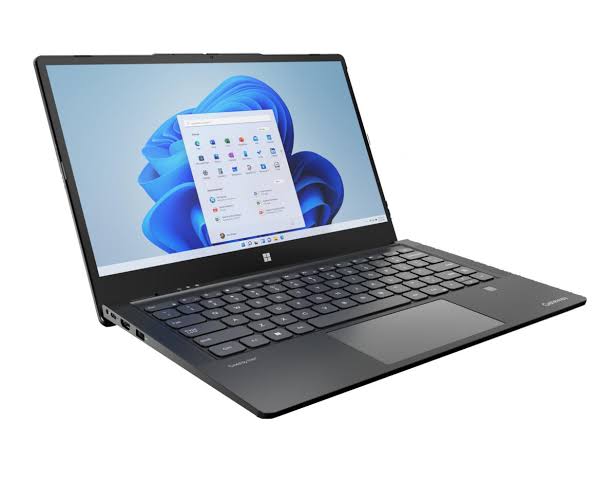
The U488575PV-3S1P is a six-cell lithium-polymer pack used in the Gateway Ultra Slim 14.1 family, including the GWTC51427 and GWTC51427-BK. The same cell is also listed under Hasee part numbers U488575 / U488575PV and the Haier equivalent U438575PV-3S1P, so if you are cross-shopping, those numbers point at the same physical pack. Always match the values below against the label on your own battery before ordering.
Part number: U488575PV-3S1P
Compatible models: Gateway Ultra Slim 14.1 GWTC51427 / GWTC51427-BK
Cross-reference numbers: U488575, U488575PV, U438575PV-3S1P
Capacity: 4500mAh / 51.3Wh
Voltage: 11.4V
Cells: 6-cell Li-polymer
Colour: Black
Typical warranty: 12 months
Two numbers matter most here. The 11.4V rating reflects the 3S configuration — three cells in series at 3.8V each — so a pack sold as “4500mAh” but rated at a different voltage will not work and may damage the charging circuit. The 51.3Wh figure is what actually determines runtime, and it is the number to watch when a battery report starts showing capacity loss.
For context, the GWTC51427 itself is a budget 14.1-inch ultra-slim with an Intel Core i5-1235U, 8GB of soldered RAM, and a 512GB SSD. Gateway rates it for about 10 hours of runtime, and independent testing has landed anywhere from under seven to over eleven hours depending on the workload. That baseline is worth remembering when you judge whether your current battery has genuinely failed.
Symptom 1: Battery Life Has Collapsed
Every lithium pack loses usable capacity as it ages, and heat accelerates that loss. The question is not whether your laptop runs shorter than it did on day one — it will — but whether the decline has crossed from inconvenient into unworkable.
The clearest signs that replacement is due:
- The laptop used to clear a full workday and now needs the charger within two or three hours.
- It shuts down abruptly at 20% or 30% instead of running down to zero.
- Windows reports a critical battery warning far earlier than the percentage suggests, or the percentage jumps when you unplug.
- The machine has to stay plugged in to hold normal performance, and slows noticeably the moment you disconnect.
Before blaming the hardware, rule out software and settings. A background process, a browser tab left running a video, or a stuck Windows update can drain a healthy battery fast. Check Task Manager for unexpected CPU and disk activity, and look at the battery usage view to see what dominated the last 24 hours. If one process stands out, that is your culprit — not the cell. If the drain is spread evenly and the total runtime has shrunk month over month, the battery is the likely cause.
There is also a known trap on this class of laptop: Windows power plans, battery saver thresholds, and third-party vendor utilities can all throttle the machine in ways that look like a failing battery. Confirm your power mode is set to Balanced or Better Performance before you conclude the pack is bad.
Symptom 2: The Battery Won’t Charge
Here is the trap most people fall into: a laptop that won’t charge is not automatically a laptop with a dead battery. Charging failures almost always trace back to one of five sources — the wall outlet, the charger brick, the charging port, a software or driver glitch, or the battery itself.
Work through these in order before spending money on a new pack:
- Try a different outlet and a known-good charger. Power strips fail and charger cables wear out, especially near the tip where they bend every time the laptop goes into a bag. If the charging light flickers when you wiggle the cord, the cable is the problem.
- Inspect the charging port. If you have to angle the plug “just right” to get a charge, the port’s solder joints may be loose — a port repair, not a battery replacement.
- Read the status in Windows. Hover the battery icon. “Plugged in, charging” means the hardware chain works and your battery may simply be old. “Plugged in, not charging” points at the battery. “On battery” while physically plugged in points at the port or charging circuit.
- Reset the power controller. Shut down, unplug the charger, then hold the power button for 30 to 60 seconds to drain residual charge from the motherboard capacitors. Plug back in and boot.
- Reinstall the battery driver. In Device Manager, expand Batteries, right-click “Microsoft ACPI-Compliant Control Method Battery,” and uninstall it. Unplug for ten seconds, plug back in, and let Windows reinstall a clean driver.
If a certified charger, a clean port, and a driver reinstall still leave the laptop refusing to charge, the battery or its internal management board is the remaining suspect. Note also that this model charges through a dedicated 19V barrel connector rather than USB-C, so a USB-C charger will not work no matter how good it is — the barrel plug is the only path in.
How to Tell If the Battery Is Actually Damaged
Windows will tell you the truth if you ask it correctly. Open Command Prompt as Administrator and run powercfg /batteryreport, then open the HTML file it saves. Under “Installed batteries,” compare Design Capacity against Full Charge Capacity.
Above 70% of design capacity means the battery is still healthy and the fault lies elsewhere — charger, port, settings, or board. Between 50 and 70% means significant wear: it may still charge, but runtime will be short and you should start planning a replacement. Below 50% means the cells can no longer hold a useful charge, and further troubleshooting is a waste of time. On a 51.3Wh design, that threshold works out to roughly 26Wh of remaining capacity.
Software is not the whole story, though. Some symptoms mean “stop using it now,” and they are physical:
- A swollen or bulging pack — the chassis flexes, the touchpad lifts, or the bottom case no longer sits flat. This is internal gas buildup from degraded chemistry and carries a fire risk.
- The battery is hot to the touch during charging, or the laptop gets unusually warm on the underside even at idle.
- A burning or chemical smell, or any hissing or crackling sound from the battery area.
- The machine will not power on at all without the charger, even after the pack has been left to charge overnight.
If the battery is swollen, stop using and charging the laptop immediately. Do not press the case back into shape, do not puncture the pack to “let the gas out” — that gas is flammable and toxic — and do not keep the laptop on soft furnishings where it cannot cool. Power it down, keep it away from heat, and take it to a professional or a battery recycling point.
For the non-safety symptoms, a usage-time test helps confirm what the report is telling you. Charge to 100%, then use the laptop normally and log the time it takes to reach 20%. Compare that window with the roughly 10 hours Gateway advertises for a healthy GWTC51427. Closing the gap is normal wear; a collapse to two or three hours is a dead pack.
Usage Scenarios: Who Hits the Limit First
How long a U488575PV-3S1P lasts before it needs replacing depends heavily on how the laptop is used. Cycle count matters more than age on the calendar, and heat is the single biggest accelerator of wear.
A light daily user — documents, browsing, email, and the odd video — draws gently on the 51.3Wh pack and typically gets through a full day on one charge. For these users, replacement often doesn’t come due for three years or more.
A student or office user who runs video calls, keeps a dozen browser tabs open, and leaves the machine plugged in all day will cycle the battery far more often. Here the pack tends to reach its limit in roughly two to three years.
A creative or developer workload pushes it harder still, with sustained CPU load, external displays, and long build or render sessions. That combination of heat and high current draw is one of the fastest ways to age the cells.
And a user who works in hot environments, or who leaves the laptop running on a bed or sofa where the vents are blocked, can wear the battery out well before it reaches a high cycle count — heat accelerates chemical ageing regardless of how many times it has been charged.
The pattern is consistent: a laptop that is throttled by a dead battery will often feel slow and underpowered, which is the opposite of what people expect. On many systems, a degraded pack causes the firmware to cut performance to protect itself, so a sluggish machine can be a battery symptom, not just a CPU one. That is worth remembering when you decide whether the fix is a tune-up or a new pack.
Replacing the U488575PV-3S1P in a Gateway GWTC51427
The GWTC51427 uses an internal battery accessed from the underside, so the job starts with removing the bottom cover and then the battery screws and connector. It is an intermediate-level repair, roughly 20 to 40 minutes for someone comfortable with small screws, and considerably longer the first time.
What the job involves
- Power the laptop fully off and unplug the charger.
- Remove the bottom case screws, keeping them sorted by length so you do not mix them up on reassembly.
- Disconnect the battery connector from the motherboard before touching anything else.
- Remove the screws securing the battery to the chassis.
- Lift the old pack out slowly — if it feels stuck, check for an adhesive strip or a screw you have missed rather than forcing it.
- Seat the replacement battery, reconnect the connector firmly, and refit the retaining screws.
- Refit the bottom cover and charge the new battery fully before first use.
Never bend, puncture, or crush the battery during removal — a punctured cell can ignite. Work on a clean, non-conductive surface, and if the old pack is swollen, treat it as hazardous and dispose of it at a battery recycling point rather than household waste. Opening the laptop may void any remaining warranty, so if the machine is still under coverage, a service centre is the better route.
Gateway GWTC51427 at a glance (for context)
- Display: 14.1″ IPS, 1920 × 1080, 60Hz
- Processor: Intel Core i5-1235U (12th gen, 10 cores)
- Graphics: Intel Iris Xe G7
- Memory: 8GB, soldered and not upgradeable
- Storage: 512GB SSD, with room for a second drive
- Battery: 4500mAh / 51.3Wh, 11.4V, internal
- Charging: 19V barrel adapter
- Rated runtime: around 10 hours
- Weight: roughly 1.66 kg
Choosing a Safe Replacement Battery
Not all packs sold as U488575PV-3S1P are equal. The market carries genuine OEM pulls, quality aftermarket equivalents, and cheap cells that overstate capacity and skimp on protection circuitry. A few checks separate the good from the risky:
- Match the voltage exactly. Confirm 11.4V on the label before ordering — a mismatched voltage is the most common and most damaging mistake.
- Confirm the cell configuration. This is a 6-cell 3S pack; a pack built as 3S2P or a different cell count will have different dimensions even at the same mAh rating.
- Look for real certifications. CE, RoHS, UL, and FCC marks indicate the pack has passed independent safety and quality testing.
- Prefer genuine or grade-A cells. Reputable sellers specify cell grade and back it with a warranty, typically 12 months.
- Check dimensions and the connector shape against your original. A matching part number does not guarantee a matching physical design across regional variants.
- Buy from a seller with a clear return policy. A 30-to-60-day return window plus a written warranty is a reasonable baseline.
Treat the cross-reference numbers carefully. U488575, U488575PV, and the Haier U438575PV-3S1P all describe the same family of cells, but regional variants can differ in connector and mounting. If in doubt, send the seller a photo of your battery label before ordering.
Making a New Battery Last
A replacement only pays off if you protect it. These habits meaningfully extend the life of a U488575PV-3S1P:
- Stay in the 20–80% band where practical. Partial charges stress the cell less than deep cycles, but do not let micromanaging every charge stop you from using the laptop.
- Avoid leaving it plugged in at 100% for days on end. If you use the laptop as a desktop replacement, enable a charge limit if your model supports one.
- Keep the vents clear. Blocking the underside on a bed or sofa traps heat right beside the battery.
- Use the original or a certified 19V adapter. Cheap substitutes deliver unstable voltage that wears the charging circuit.
- Store at around 50% if unused. If the laptop will sit for weeks, charge it to roughly half and keep it somewhere cool and dry.
- Do not routinely run to 0%. Frequent full discharges add wear and will not restore lost capacity.
Frequently Asked Questions
Is the U488575PV-3S1P the right battery for my Gateway GWTC51427?
Yes — U488575PV-3S1P is the battery used in the Gateway Ultra Slim 14.1 GWTC51427 and GWTC51427-BK. Verify the voltage (11.4V) and connector shape against your original label before ordering, and check whether the seller lists your exact model in the compatibility list.How long should a 4500mAh laptop battery last before it needs replacing?
Most laptop lithium packs deliver roughly 300 to 500 full charge cycles, or about two to four years of typical use, before capacity drops noticeably. Heavy users who run the machine hot and cycle it daily will land at the shorter end; light users on mains power can go longer.My Gateway won’t charge. Is the battery dead?
Not necessarily. Test a different outlet and charger, check the barrel port for looseness, read the Windows battery status message, perform a power reset, and reinstall the battery driver. If it still won’t charge with a known-good charger, the battery or its management board is the likely fault.Can I replace the battery myself?
Yes, it is an intermediate repair. You will need a small Phillips screwdriver and some care with the plastic clips. The key steps are removing the bottom cover, disconnecting the battery connector before anything else, and disposing of the old pack safely — especially if it is swollen.What are the danger signs that mean stop using the laptop immediately?
A swollen or bulging battery, the chassis flexing or the touchpad lifting, the pack getting hot during charging, a burning smell, or hissing or crackling sounds. Power the laptop down, keep it away from heat, and take it to a professional or battery recycler. Do not puncture a swollen pack.Why does my laptop feel slow when it used to be fast?
A degraded battery can cause the system to limit performance to protect itself, and a machine that cannot hold enough voltage will throttle under load. Running a battery report is a quick way to check whether capacity loss is behind the slowdown before you assume the hardware is simply outdated.
If your Gateway GWTC51427 dies within a couple of hours, shuts down at 30%, or refuses to charge even with a known-good 19V adapter, the 4500mAh U488575PV-3S1P pack has likely reached the end of its useful life. Run a battery report, rule out charger and port faults first, replace the battery with a certified 11.4V pack, and treat any swelling as an immediate stop-use situation.