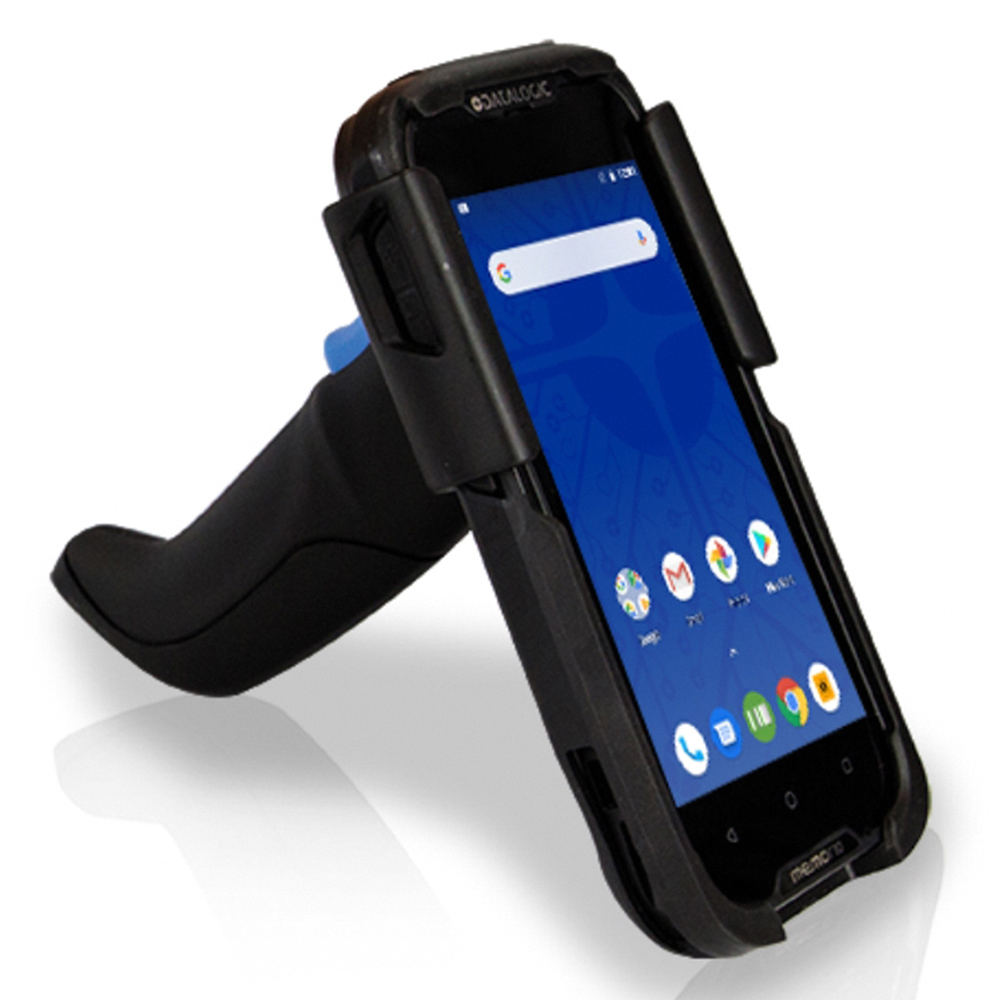
The Datalogic Memor 10 DM88 is a powerful mobile computer widely used in retail, logistics, warehousing, healthcare, and industrial environments. As a professional handheld terminal, it requires a reliable battery to support barcode scanning, data collection, wireless communication, and long working hours.
However, after extended use, the original battery may gradually lose capacity. Users may experience shorter operating time, charging failures, unexpected shutdowns, or reduced work efficiency.
The Replacement Battery BTDL35 3980mAh is designed to restore the power performance of the Datalogic Memor 10 DM88. A high-quality replacement battery can provide stable power output and help extend the service life of your handheld device.
Why Does the Datalogic Memor 10 DM88 Battery Drain Quickly?
A short battery life is one of the most common issues faced by users of handheld mobile computers.
1. Battery Aging After Long-Term Use
Lithium-ion batteries naturally lose capacity after many charge cycles. Over time, the internal battery cells become less efficient and cannot store the same amount of energy as before.
Common symptoms include:
- The Datalogic Memor 10 runs for fewer hours
- Battery percentage drops quickly
- Frequent charging is required
- The device shuts down unexpectedly
- Scanning tasks cannot be completed in one shift
When these problems appear, replacing the old battery with a BTDL35 3980mAh battery replacement can help restore normal operating time.
2. Heavy Professional Workloads Increase Power Consumption
The Datalogic Memor 10 DM88 is often used in demanding environments where the device operates continuously.
Battery consumption increases when using:
- Barcode scanning frequently
- Wi-Fi or Bluetooth connections
- Mobile data communication
- Bright screen settings
- Long working sessions
A reliable battery is essential for maintaining productivity during busy workdays.
Datalogic Memor 10 DM88 Battery Not Charging: Causes and Solutions
If your Datalogic Memor 10 DM88 cannot charge properly, the problem may come from the charger, charging port, or battery itself.
Check the Charger and Charging Accessories
Before replacing the battery, check:
- Whether the charger works correctly
- Whether the charging cable is damaged
- Whether the power source is stable
- Whether the charging connection is secure
Sometimes charging accessories, rather than the battery, cause charging issues.
Clean the Battery and Charging Contacts
Dust and dirt can affect electrical connections.
Recommended steps:
- Turn off the Datalogic Memor 10 DM88
- Remove the battery if possible
- Clean the contact points carefully
- Reinstall the battery
- Test charging again
Keeping the contacts clean helps maintain stable charging performance.
The BTDL35 Battery May Be Damaged
If charging problems continue after checking the accessories, the battery may have reached the end of its service life.
Possible signs include:
- Battery percentage does not increase
- Charging stops unexpectedly
- Device only works when connected to power
- Battery drains immediately after charging
In these cases, replacing the battery is usually the most effective solution.
How to Tell If the BTDL35 Battery Is Damaged?
Before purchasing a replacement battery, users can check several warning signs.
1. Significantly Reduced Battery Runtime
A damaged or aged battery may cause:
- Shorter operating hours
- Frequent charging requirements
- Device shutdown during work
This usually indicates that the battery capacity has decreased.
2. Unexpected Device Shutdowns
A weak battery may fail to provide stable power.
Symptoms include:
- The terminal turns off during scanning
- Applications stop suddenly
- The device restarts without warning
A new BTDL35 3980mAh replacement battery can provide more stable power delivery.
3. Slow or Abnormal Charging
Battery problems may appear as:
- Charging takes much longer than before
- Battery never reaches full capacity
- Battery percentage changes suddenly
- Fast power loss after charging
These issues often indicate battery degradation.
4. Battery Swelling or Overheating
Stop using the battery if you notice:
- Excessive heat during charging
- Battery swelling
- Physical deformation
- Unusual smell
These signs may indicate internal battery damage.
Benefits of Choosing a BTDL35 3980mAh Replacement Battery
Longer Working Time
The BTDL35 3980mAh battery provides sufficient capacity for extended daily operations with the Datalogic Memor 10 DM88.
Stable Power Performance
A new battery helps maintain:
- Reliable device operation
- Consistent scanning performance
- Stable wireless communication
Reduce Work Interruptions
A dependable battery reduces downtime caused by frequent charging or unexpected shutdowns.
Extend Device Lifespan
Replacing only the battery is a cost-effective way to extend the service life of your Datalogic handheld terminal.
Common Usage Scenarios for Datalogic Memor 10 DM88 Battery
Retail and Inventory Management
The Datalogic Memor 10 DM88 is widely used for:
- Barcode scanning
- Stock checking
- Product management
- Price verification
A strong battery ensures smooth operation throughout busy business hours.
Warehousing and Logistics
In warehouses, workers rely on handheld terminals for:
- Inventory tracking
- Order processing
- Shipment management
- Data collection
A long-lasting battery helps improve efficiency.
Healthcare Applications
Mobile terminals are used in healthcare environments for:
- Patient information management
- Medication tracking
- Data recording
Reliable battery performance is important for uninterrupted workflows.
Manufacturing and Industrial Environments
In factories, the Datalogic Memor 10 DM88 supports:
- Production tracking
- Quality inspection
- Equipment management
A replacement battery ensures the device remains available during working hours.
Tips to Extend BTDL35 Battery Life
To maximize battery performance:
- Avoid completely draining the battery frequently
- Use compatible chargers
- Keep the device away from extreme temperatures
- Clean charging contacts regularly
- Avoid using damaged batteries
- Store the device with proper battery level when not used for long periods
Battery problems such as short runtime, charging failure, and unexpected shutdowns can reduce the efficiency of the Datalogic Memor 10 DM88. For users who depend on this handheld terminal for daily operations, a reliable battery is essential.
The Replacement Battery BTDL35 3980mAh for Datalogic Memor 10 DM88 provides a practical solution to restore battery performance and extend device usability.
Whether used in retail, logistics, healthcare, or industrial environments, a quality replacement battery helps keep your Datalogic Memor 10 DM88 powered and ready for professional tasks.