Robot vacuum cleaners have become an essential part of modern smart homes, helping users maintain clean floors with minimal effort. However, after long-term use, the battery inside a robot vacuum may gradually lose capacity, resulting in shorter cleaning time, charging problems, and unexpected shutdowns.
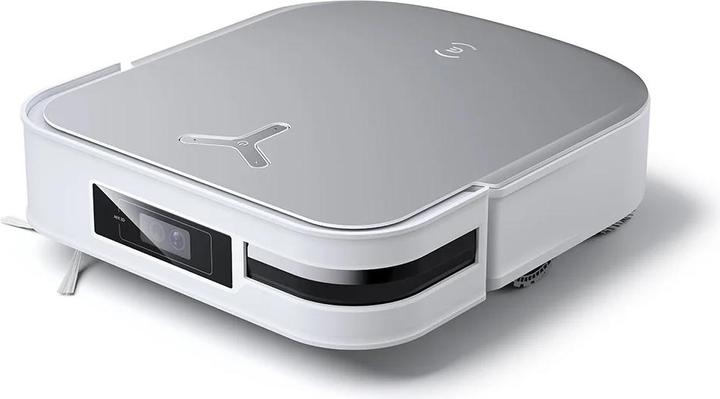
For users experiencing battery issues with their Ecovacs Deebot X2 OMNI Robot Vacuum, the S19-LI-144-6400 Battery Replacement 5900mAh/84.96Wh provides a reliable solution to restore cleaning performance and extend the service life of the device.
Why Does the Ecovacs Deebot X2 OMNI Battery Life Become Short?
A common problem with aging robot vacuum batteries is reduced runtime. Lithium-ion batteries naturally lose capacity after many charging cycles, making it difficult for the vacuum to complete normal cleaning tasks.
Common signs of reduced battery performance include:
- The robot vacuum cleans for a shorter time than before.
- The battery percentage drops quickly.
- The Deebot returns to the charging dock more frequently.
- The vacuum stops cleaning before finishing the scheduled task.
- The device shuts down unexpectedly during operation.
High-energy features such as strong suction modes, automatic cleaning programs, mapping functions, and frequent daily cleaning can increase power consumption. When the original battery becomes worn out, replacing it with a 5900mAh S19-LI-144-6400 Battery can help improve runtime and cleaning efficiency.
Why Is the Ecovacs Deebot X2 OMNI Battery Not Charging?
Another common battery issue is charging failure. Users may notice that their robot vacuum cannot charge properly or cannot maintain power after charging.
Typical symptoms include:
- The robot vacuum does not charge on the dock.
- The charging indicator does not respond.
- Battery level remains unchanged after charging.
- The vacuum stops shortly after leaving the charging station.
- Charging takes much longer than usual.
Possible causes include:
- The battery cells have degraded over time.
- The battery has reached the end of its service life.
- The internal battery protection circuit has failed.
- The charging contacts are dirty.
- The charging dock or power adapter has problems.
Before replacing the battery, check the charging station, clean the charging contacts, and confirm that the power supply works properly. If charging problems continue, the battery may need replacement.
How to Determine Whether the S19-LI-144-6400 Battery Is Damaged?
Before purchasing a replacement battery, users can check several signs to determine whether the battery is failing.
1. Check Battery Runtime
Fully charge the Ecovacs Deebot X2 OMNI and observe its cleaning performance.
A damaged battery usually shows:
- Extremely short cleaning time.
- Rapid battery percentage drops.
- Unexpected shutdowns.
- Reduced performance compared with when the device was new.
If the vacuum cannot complete regular cleaning cycles, the battery may have lost significant capacity.
2. Inspect for Physical Battery Problems
Battery damage can sometimes be identified through physical symptoms.
Check for:
- Battery swelling.
- Unusual heat during charging.
- Strange smells.
- Damaged connectors.
- Abnormal device deformation.
If any physical damage is found, stop using the battery and replace it with a compatible model.
3. Monitor Charging Performance
A failing battery may cause:
- Slow charging speed.
- Charging stops before reaching full capacity.
- Battery drains immediately after charging.
- Robot vacuum restarts unexpectedly.
These issues often indicate that the original battery can no longer store energy effectively.
Application Scenarios of Ecovacs Deebot X2 OMNI Battery Replacement
The S19-LI-144-6400 Battery Replacement is suitable for users who rely on their robot vacuum for daily cleaning and smart home management.
Daily Home Cleaning
For households that use the Ecovacs Deebot X2 OMNI every day, a reliable battery ensures longer cleaning sessions and fewer interruptions.
Large Homes and Multiple Rooms
A high-capacity battery helps the robot vacuum cover larger areas without frequently returning to the charging dock.
Pet Owner Cleaning Needs
Homes with pets often require more frequent cleaning because of hair and dust. A healthy battery supports longer cleaning cycles and stronger performance.
Smart Home Automation
Many users schedule automatic cleaning through smart home systems. A reliable battery ensures the robot can complete scheduled tasks without unexpected power loss.
Benefits of Replacing the Ecovacs Deebot X2 OMNI Battery
Choosing a compatible 5900mAh/84.96Wh S19-LI-144-6400 Battery provides several advantages:
- Restores longer cleaning runtime.
- Reduces charging frequency.
- Improves robot vacuum reliability.
- Extends the service life of the device.
- Provides a cost-effective alternative to buying a new vacuum.
Before replacement, always confirm the battery model, voltage, capacity, connector type, and compatibility with your Ecovacs Deebot X2 OMNI.
A short battery life, charging failure, or unexpected shutdown usually indicates that a robot vacuum battery has aged and lost capacity.
The Replacement Battery S19-LI-144-6400 5900mAh/84.96Wh For Ecovacs Deebot X2 OMNI Robot Vacuum offers an effective solution for restoring cleaning performance. Whether used for daily cleaning, pet hair removal, large homes, or smart home automation, a reliable replacement battery helps keep your robot vacuum operating efficiently.