You unplug your Hasee laptop in the morning expecting several hours of productive work. But after a short period of browsing, document editing, or online meetings, the battery percentage drops much faster than it used to. Even worse, the laptop may become warm during normal use, charge slowly, or suddenly shut down while showing battery power remaining.
If this sounds familiar, the issue may not be the laptop itself. In many cases, an aging battery is the real reason behind declining performance.
Common Signs of a Failing Laptop Battery
Laptop batteries naturally wear out over time. As their capacity decreases, several noticeable problems can appear.
Rapid Battery Drain
One of the earliest warning signs is significantly reduced battery life. Tasks that previously consumed little power now seem to drain the battery quickly.
Slow Charging
The laptop takes much longer to reach a full charge, even when using the original charger.
Unexpected Shutdowns
The system may suddenly power off despite displaying 20%, 30%, or even higher battery levels.
Excessive Heat
A worn battery can generate additional heat during charging and daily operation.
Reduced Mobility
Instead of working comfortably away from a power outlet, you constantly need to keep the charger nearby.
Why Does Battery Performance Decline?
Lithium-ion batteries have a limited lifespan. Every charge and discharge cycle gradually reduces their maximum capacity.
Several factors can accelerate battery aging:
- Frequent charging cycles
- High operating temperatures
- Continuous heavy workloads
- Keeping the laptop plugged in all the time
- Years of regular use
Eventually, the battery can no longer store enough energy to provide reliable performance.
Troubleshooting Common Battery Problems
Before replacing your battery, you can try several steps to identify the cause.
Check Power-Hungry Applications
Some background applications may consume excessive power without being noticed.
Adjust Power Settings
Using battery-saving modes can temporarily improve runtime.
Verify Charger Performance
A faulty charger or charging cable can contribute to charging-related issues.
Monitor Battery Health
If battery capacity has dropped significantly, software optimizations may provide only limited improvements.
Replace the Battery
When battery degradation becomes severe, replacement is often the most effective solution.
Replacement Battery 4569127-2S for Hasee Laptops
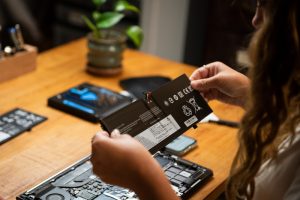
The Replacement Battery 4569127-2S is designed for compatible Hasee laptop models and can help restore stable battery performance.
The 6150mAh 4569127-2S Battery provides dependable power for everyday tasks, helping reduce interruptions caused by rapid battery drain.
Compatible Models
This battery is compatible with selected Hasee laptop models, including:
- Hasee X4 D2
- Hasee X3 D1
- HNX4S01
- 40073245
- 3770300
Always verify your original battery model before purchasing a replacement.
When Should You Replace Your Battery?
Consider replacing your battery if you notice several of the following symptoms:
- Battery life is less than half of its original runtime
- Frequent unexpected shutdowns
- Significant overheating during charging
- Charging takes much longer than before
- Battery performance continues to worsen over time
If your laptop no longer provides the battery life it once did, an aging battery may be the underlying cause. Rapid battery drain, slow charging, overheating, and unexpected shutdowns are all common indicators of battery wear.
Installing a new Hasee 4569127-2S Battery can help restore reliable performance, improve mobility, and extend the useful life of your laptop without the expense of purchasing a new device.