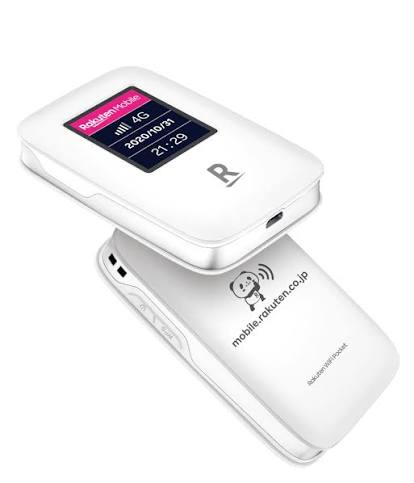
The Rakuten WiFi Pocket R310 is useful when you need a portable internet connection at home, work, or while traveling. However, after regular use, the battery may gradually lose its ability to hold a charge. Short battery life, charging problems, and unexpected shutdowns can make the device less convenient to use.
If your Rakuten WiFi Pocket R310 is no longer working as expected, checking the battery is a good place to start. The 3000-R310 replacement battery is a 3000mAh battery designed for the Rakuten WiFi Pocket R310.
Why Is the Rakuten R310 Battery Draining Quickly?
A noticeable reduction in battery life is one of the first signs of battery aging. You may find that your R310 used to work for a long period after charging, but now the battery level drops much faster.
Continuous WiFi use can naturally consume a significant amount of power. Weak network signals can also cause the device to work harder to maintain a connection, which may increase battery consumption.
However, if the battery drains unusually fast even when the device is not heavily used, the battery may have lost part of its original capacity.
A worn battery can make the R310 less practical for travel or other situations where access to a power outlet is limited.
What If the R310 Battery Cannot Be Charged?
Another common problem is that the Rakuten WiFi Pocket R310 does not charge normally.
You may connect the device to a charger, but the battery level does not increase. In some cases, the device may only work while connected to the charger and shut down immediately after the charger is removed.
Before replacing the battery, check the charging cable, power adapter, and charging port. Make sure the connections are clean and secure.
If the charging equipment works normally but the battery still cannot charge or hold power, the battery may have reached the end of its service life.
How to Tell If the Battery Is Damaged
It is not always easy to determine whether a WiFi Pocket problem is caused by the battery. Several symptoms can provide useful clues.
If the R310 loses power shortly after a full charge, the battery capacity may have decreased significantly. Frequent unexpected shutdowns can also indicate that the battery is no longer supplying stable power.
Another sign is abnormal charging behavior. If the battery takes much longer than usual to charge or the displayed battery level changes unusually quickly, it may be worth checking the battery condition.
Physical changes should also be taken seriously. If the battery becomes swollen, deformed, unusually hot, or shows other visible damage, stop using it and have it inspected by a qualified technician.
Replacing the Rakuten WiFi Pocket R310 Battery
When the original battery can no longer provide reliable performance, replacing it may be a practical solution.
The 3000-R310 replacement battery has a capacity of 3000mAh and is intended for the Rakuten WiFi Pocket R310. Before purchasing a replacement, compare the battery model, capacity, voltage, dimensions, connector, and other specifications with the battery currently installed in your device.
Checking these details helps avoid compatibility problems and ensures that the replacement battery is suitable for the R310.
Useful for Travel and Mobile Internet
A portable WiFi device is especially useful when you are away from a fixed internet connection.
The Rakuten WiFi Pocket R310 can be used during travel, business trips, temporary work locations, or other situations where you need a portable internet connection. It can also be useful as a backup connection when your regular network is unavailable.
In these situations, short battery life can become a major inconvenience. A battery that loses power quickly may require frequent charging or keep the device connected to a power source.
Replacing an aging battery can make the device more convenient for everyday mobile internet use.
Check the Battery Before Blaming the Device
When a Rakuten WiFi Pocket R310 suddenly becomes less reliable, the device itself may not necessarily be faulty. Battery aging is a common reason for shorter runtime and charging problems.
Before deciding that the entire device needs to be replaced, check the battery condition, charging cable, adapter, and charging port. If the battery is clearly worn out, a compatible 3000-R310 battery replacement may be enough to solve the problem.
For users who rely on their R310 for travel, work, or everyday portable internet access, keeping the battery in good condition can help maintain more consistent performance.