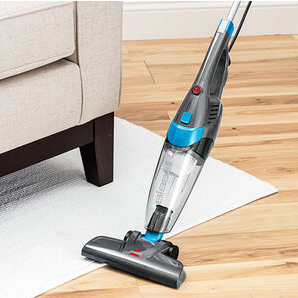
A cordless vacuum is only as useful as its battery. When a Bissell cordless vacuum starts losing power much faster than before, refuses to charge, or shuts down during cleaning, the battery may be reaching the end of its service life.
The 69-0096-041 2500mAh replacement battery can be a practical solution for compatible Bissell equipment. Instead of replacing the entire vacuum because of declining battery performance, replacing the worn-out battery may help restore more reliable cleaning time.
Why Does a Bissell Vacuum Battery Run Out So Quickly?
A significant reduction in runtime is one of the most common signs of battery aging. A vacuum that once completed a cleaning session on a single charge may eventually require charging halfway through the job.
Common reasons include:
- Normal battery aging and repeated charge cycles
- Reduced battery capacity over time
- Frequent use of high-power cleaning modes
- Long-term storage without proper charging
- Exposure to excessive heat or cold
- Increased resistance or deterioration inside the battery pack
If your Bissell vacuum battery drains quickly, a replacement battery may be worth considering.
For homes with pets, children, carpets, or larger floor areas, short battery life can be particularly frustrating because cleaning may have to stop before the job is finished.
Bissell Battery Will Not Charge: What Can You Check?
A Bissell vacuum battery that won’t charge can be caused by several different issues. Before replacing the battery, perform a few basic checks.
1. Check the Power Source
Make sure the wall outlet is working correctly. If the charging adapter uses a removable cable, check that all connections are secure.
2. Inspect the Charging Contacts
Dust and debris can accumulate around charging contacts. Carefully inspect the contacts and make sure there is no visible contamination or physical damage.
3. Check the Charger
If the charger is damaged or malfunctioning, the battery may not receive power correctly. If you have access to a known-compatible charger, it may help determine whether the charger or battery is causing the problem.
4. Observe Charging Behavior
If the vacuum repeatedly indicates charging but never reaches a full charge, or the battery loses power immediately after being disconnected, the battery may have significantly deteriorated.
How to Tell If a Bissell Battery Is Damaged
Not every charging problem means that the battery itself is defective. However, several symptoms can indicate that the battery needs replacement.
Watch for these signs:
- The vacuum runs for only a few minutes after a full charge.
- Battery runtime has declined significantly.
- The battery cannot reach a full charge.
- The vacuum shuts down unexpectedly.
- Battery percentage drops unusually fast.
- The battery becomes abnormally hot during charging or use.
- The battery pack shows swelling, cracks, leakage, or other physical damage.
- Charging repeatedly starts and stops.
If a battery is swollen, leaking, cracked, or unusually hot, stop using it and do not attempt to repair or open the battery pack.
For users who need a definitive diagnosis, battery voltage and capacity can be checked with suitable testing equipment by a qualified technician.
69-0096-041 2500mAh Replacement Battery
The 69-0096-041 2500mAh replacement battery is intended for compatible Bissell equipment requiring this battery model.
When selecting a replacement battery, don’t look at capacity alone. Check the following specifications before installation:
- Battery model: 69-0096-041
- Capacity: 2500mAh
- Voltage and electrical specifications
- Battery dimensions
- Connector configuration
- Terminal arrangement
- Compatibility with the original equipment
Always compare the information printed on your original battery with the replacement battery specifications before purchasing.
Why Does Battery Capacity Matter for Cordless Vacuum Cleaners?
Battery capacity directly influences how long a cordless vacuum can operate between charges. However, actual runtime also depends on how the vacuum is used.
For example, high-power modes generally consume more energy than standard modes. Cleaning thick carpets, removing pet hair, or operating motorized brush heads continuously can also increase power consumption.
This means two users with the same battery may experience different runtimes depending on their cleaning habits and home environment.
A healthy replacement battery can help restore more predictable performance when the original battery has significantly degraded.
Where Can a Bissell Replacement Battery Be Useful?
A replacement battery can be useful in many everyday cleaning situations.
Daily Home Cleaning
For kitchens, bedrooms, living rooms, and hallways, a cordless vacuum provides convenient cleaning without managing a power cable. A healthy battery helps ensure the vacuum is ready whenever you need it.
Pet Hair Removal
Homes with cats or dogs often require frequent vacuuming. If the vacuum repeatedly runs out of power while cleaning pet hair, a replacement battery can help reduce interruptions.
Carpet Cleaning
Carpets can require more cleaning power than hard floors. If your vacuum’s battery is already degraded, high-power operation can make the runtime problem even more noticeable.
Quick Cleanups
Cordless vacuums are particularly convenient for cleaning crumbs, dust, dirt, and small messes. A dependable battery ensures the vacuum can be used immediately without waiting for a long recharge.
Larger Homes
Cleaning multiple rooms in one session places greater demands on the battery. Keeping a spare fully charged replacement battery can be useful when extended cleaning time is required, provided the vacuum is designed to support battery replacement.
How to Extend the Life of a Replacement Battery
Once you install a new battery, proper usage can help maintain performance.
Use the correct charger: Always use a charger and charging system compatible with your Bissell equipment.
Avoid extreme temperatures: Excessive heat can negatively affect rechargeable battery performance.
Don’t store the battery improperly: If the vacuum will not be used for an extended period, follow the manufacturer’s recommended storage procedure.
Keep the charging contacts clean: Dust and debris can interfere with charging.
Monitor unusual behavior: Excessive heat, swelling, or unexpected shutdowns should not be ignored.
Is It Time to Replace Your Bissell Battery?
If your Bissell cordless vacuum has developed short battery life, charging problems, or unexpected shutdowns, the battery may be one of the first components worth checking.
A compatible 69-0096-041 2500mAh replacement battery can provide a practical way to address battery-related performance issues without replacing the entire vacuum.
Whether you’re dealing with everyday household cleaning, pet hair, carpets, or quick cleanup jobs, a reliable battery helps keep your cordless vacuum ready for use. Before ordering, always verify the 69-0096-041 model number, voltage, connector, dimensions, and equipment compatibility to ensure the replacement battery is suitable for your device.