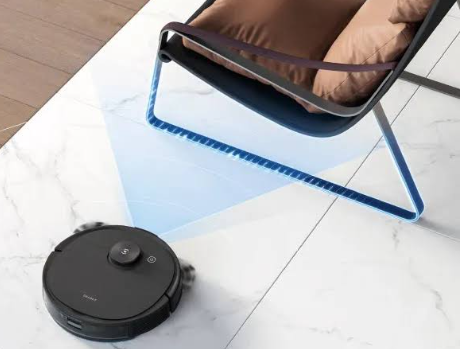
Robot vacuums have become an essential part of modern home cleaning. However, after years of use, battery performance may gradually decline, resulting in shorter cleaning times and charging issues. If your Ecovacs Deebot T8 series robot vacuum is no longer delivering the runtime you expect, the S10-LI-144-5200 5200mAh replacement battery can help restore cleaning performance and extend the life of your device.
This guide explains common battery problems, charging issues, how to determine whether your battery is damaged, and the benefits of replacing your Deebot battery.
Compatible Models
The S10-LI-144-5200 battery is compatible with:
- Ecovacs Deebot T8
- Ecovacs Deebot T8 AIVI
- Ecovacs Deebot T8+
- Ecovacs Deebot T8AIVI
Always verify the battery model before purchasing a replacement.
Why Is My Robot Vacuum Battery Draining Quickly?
Battery runtime naturally decreases as the battery ages.
Battery Aging
Lithium-ion batteries lose capacity after hundreds of charging cycles. Over time, your robot vacuum may run for significantly shorter periods.
Frequent Cleaning Sessions
Daily cleaning routines increase battery wear and reduce overall battery lifespan.
Large Cleaning Areas
Cleaning larger homes requires more power and may make battery degradation more noticeable.
High Suction Mode Usage
Using maximum suction settings frequently can accelerate battery consumption.
Signs of Short Battery Life
- Cleaning time is much shorter than before.
- The robot returns to the charging dock more often.
- The battery percentage drops rapidly.
- Cleaning tasks remain unfinished due to low power.
Why Is the Battery Not Charging?
If your Deebot battery refuses to charge, several factors may be responsible.
Charging Dock Problems
Ensure the charging dock is connected properly and receiving power.
Dirty Charging Contacts
Dust and debris on charging terminals may prevent efficient charging.
Battery Wear
Old batteries may no longer accept or retain a charge.
Charging Circuit Issues
Internal charging components within the robot vacuum may malfunction.
Battery Protection Mode
Some batteries stop charging when abnormal voltage or temperature conditions are detected.
How to Tell If the Battery Is Damaged
Before replacing the battery, inspect it for common signs of failure.
Rapid Power Loss
A battery that loses power quickly after charging is often nearing the end of its lifespan.
Failure to Hold a Charge
If the battery reaches 100% but drains within a short period, replacement is recommended.
Overheating
Excessive heat during charging or operation may indicate internal battery damage.
Swelling or Deformation
Any visible swelling is a serious warning sign and requires immediate replacement.
Error Messages
Frequent battery-related alerts or charging failures may indicate battery degradation.
Benefits of Replacing the S10-LI-144-5200 Battery
Restore Original Runtime
A new battery helps your robot vacuum clean for longer periods on a single charge.
Improve Cleaning Efficiency
Longer runtime allows the vacuum to complete cleaning tasks without interruption.
Reduce Charging Frequency
A healthy battery requires fewer charging cycles during normal operation.
Extend Device Lifespan
Replacing the battery is often more cost-effective than purchasing a new robot vacuum.
Typical Usage Scenarios
Daily Home Cleaning
Maintain consistent cleaning performance throughout the week.
Large Houses and Apartments
A higher-capacity battery is especially beneficial for larger floor plans.
Homes with Pets
Pet hair removal often requires longer cleaning sessions and dependable battery performance.
Smart Home Automation
Ensure uninterrupted operation when using scheduled or automated cleaning routines.
Battery Maintenance Tips
To maximize battery lifespan:
- Keep charging contacts clean.
- Avoid exposing the robot vacuum to extreme temperatures.
- Use the original charging dock whenever possible.
- Store the battery in a cool, dry place if not used for extended periods.
- Run regular cleaning cycles to maintain battery activity.
The S10-LI-144-5200 5200mAh Replacement Battery for Ecovacs Deebot T8, T8 AIVI, T8+, and T8AIVI is an excellent solution for restoring runtime and cleaning performance. If your robot vacuum experiences short battery life, charging problems, overheating, or incomplete cleaning cycles, replacing the battery can significantly improve reliability and extend the service life of your device. A new battery helps ensure your Deebot continues delivering efficient, hands-free cleaning every day.