The Bose S1 Pro battery is an important part of the portable PA system, allowing users to enjoy music and amplified sound without relying on a constant power connection. For performers, presenters, DJs and event organizers, battery performance can directly affect how long the system can be used away from an outlet.
As the battery gets older, users may notice shorter operating times or changes in charging behavior. This leads to common questions such as “How long does the Bose S1 Pro battery last?” and “How to charge Bose S1 Pro battery?”
In this technology guide, we look at Bose S1 Pro battery life, the factors that affect runtime, recommended charging practices and the signs that may indicate an aging battery.
Bose S1 Pro Battery: Why Does It Matter?
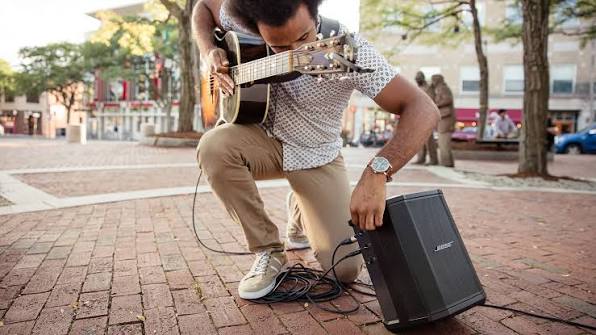
The rechargeable battery allows the Bose S1 Pro to operate as a portable sound system. This is particularly useful for outdoor performances, small events, presentations and situations where access to an electrical outlet is limited.
Like other rechargeable lithium-ion batteries, the battery inside a portable speaker gradually loses capacity as it ages. Usage frequency, charging habits, temperature and storage conditions can all influence long-term performance.
A reduction in runtime after years of use does not necessarily mean that the speaker itself is defective. In many cases, battery aging is a normal part of the product lifecycle.
Bose S1 Pro Battery Life: How Long Does It Last?
The actual Bose S1 Pro battery life can vary depending on how the system is used. Volume level, audio content, connected equipment and environmental conditions can all affect power consumption.
Using the speaker at a higher volume generally requires more energy than playing audio at a moderate level. Continuous high-output use can therefore result in shorter runtime than lighter everyday use.
Battery age is another important factor. A newer battery may provide substantially better runtime than an older battery that has already experienced many charging cycles.
Factors That Can Affect Bose S1 Pro Battery Life
- Overall volume level.
- Type and intensity of audio being played.
- Connected microphones or other equipment.
- Battery age and usage history.
- Operating temperature.
- Charging and storage conditions.
For this reason, published battery specifications should be considered a reference rather than a guarantee of identical runtime in every situation.
How to Charge Bose S1 Pro Battery
The question “how to charge Bose S1 Pro battery” is particularly important for new owners and users who want to maintain battery performance over time.
The system should be charged using the appropriate power connection and charging equipment recommended for the product. Before charging, make sure the power connection is secure and that the equipment is being used in a suitable environment.
Allowing the speaker and battery to operate within an appropriate temperature range is also important. Extremely hot or cold conditions are not ideal for lithium-ion battery charging.
Basic Charging Recommendations
- Use the appropriate power cable and charging equipment.
- Place the speaker in a dry and well-ventilated environment while charging.
- Avoid charging under extreme temperature conditions.
- Check the battery and power connection if charging does not begin normally.
- Follow the manufacturer’s charging and storage recommendations.
If the battery becomes unusually hot, shows visible damage or behaves abnormally during charging, stop using it and seek appropriate technical assistance.
Why Is the Bose S1 Pro Battery Not Lasting as Long?
A noticeable reduction in runtime can have several causes. The most common explanation for an older unit is natural battery degradation.
However, users should also consider their usage pattern. A speaker that is frequently operated at high volume may consume considerably more energy than one used at moderate volume levels.
If the runtime suddenly changes rather than gradually decreasing, it can also be useful to check the power connection, charging equipment and overall operating conditions.
Common Signs of Battery Aging
- Playback time is significantly shorter than it used to be.
- The speaker requires charging more frequently.
- The battery level drops unusually quickly.
- The speaker shuts down unexpectedly during battery operation.
- Charging behavior becomes inconsistent.
A gradual decline in runtime is generally more consistent with normal battery aging, while sudden or unusual behavior may require further inspection.
How to Improve Bose S1 Pro Battery Life
Although battery aging cannot be completely prevented, sensible operating and storage habits can help reduce unnecessary battery stress.
- Avoid exposing the speaker to excessive heat for extended periods.
- Keep the battery away from extreme environmental conditions.
- Use compatible charging equipment.
- Avoid unnecessary operation at maximum volume when it is not required.
- Store the speaker in an appropriate environment when it will not be used for an extended period.
- Regularly inspect the battery and speaker for physical damage.
These practices cannot restore capacity that has already been lost, but they can help support more consistent battery performance over the useful life of the device.
Does Temperature Affect Bose S1 Pro Battery Performance?
Temperature is an important factor for rechargeable lithium-ion batteries. Very high temperatures can accelerate battery aging, while very cold conditions can temporarily reduce available performance.
For outdoor events, users should therefore avoid leaving the speaker exposed to direct sunlight or extreme heat for long periods. Similarly, a device brought in from a very cold environment should be allowed to reach a suitable operating temperature before demanding use or charging.
When Should You Replace the Bose S1 Pro Battery?
Battery replacement may become worth considering when the Bose S1 Pro battery life has declined substantially and no longer meets the user’s needs.
If the speaker continues to perform well in every other respect, replacing the battery may be a practical way to extend the useful life of the system instead of replacing the entire speaker.
Before purchasing a replacement, users should verify the exact product model and battery compatibility. Voltage, capacity, physical dimensions and electrical connections all need to be appropriate for the device.
Price should not be the only factor when selecting a replacement battery. Product quality, compatibility, seller reliability and warranty conditions are also important considerations.
Can You Replace the Bose S1 Pro Battery Yourself?
The difficulty of battery replacement depends on the construction of the specific speaker and the user’s technical experience. Opening electronic equipment can expose internal components and battery connections that require careful handling.
Because lithium-ion batteries store significant amounts of energy, inexperienced users should avoid improvised repair methods. A qualified repair technician can assess the battery and determine whether replacement is appropriate.
A battery that is swollen, physically damaged or unusually hot should not be opened, punctured or otherwise manipulated. In such cases, safety should take priority over attempting a DIY repair.
Bose S1 Pro Battery: Charging vs. Battery Replacement
When a speaker appears to have poor battery performance, it is useful to distinguish between a charging problem and a worn battery.
If the battery does not charge correctly, the power source, cable, connection and operating temperature should be checked first. If charging works normally but the speaker’s runtime remains dramatically shorter than before, battery aging becomes a more likely explanation.
This simple distinction can help users avoid replacing a battery unnecessarily.
Safe Handling of an Aging Lithium-Ion Battery
Rechargeable batteries should be handled carefully throughout their lifespan. Signs such as swelling, physical damage, leakage, unusual heat or abnormal charging behavior should not be ignored.
Do not puncture, crush or disassemble a damaged battery. If a battery is no longer usable, it should be handled through an appropriate battery collection or recycling program rather than being placed in ordinary household waste.
Getting the Most From Your Bose S1 Pro Battery
The Bose S1 Pro battery is essential for portable operation, and its performance can have a major impact on the usability of the sound system. The actual Bose S1 Pro battery life depends on volume, usage patterns, temperature and the age of the battery.
For users wondering how to charge Bose S1 Pro battery, the most important principles are to use appropriate charging equipment, avoid extreme temperatures and follow the manufacturer’s recommendations.
If runtime gradually becomes shorter after years of use, natural battery degradation is a likely explanation. When the battery can no longer provide sufficient operating time, a compatible replacement may help extend the life of the speaker. If the battery shows physical damage or abnormal heating, professional assistance should be sought instead of attempting an improvised repair.
Frequently Asked Questions About the Bose S1 Pro Battery
How long does the Bose S1 Pro battery last?
Battery runtime depends on volume, usage conditions, connected equipment, temperature and battery age. Actual runtime can therefore vary between users and different operating situations.
How to charge Bose S1 Pro battery?
Use the appropriate power connection and compatible charging equipment recommended for the speaker. Charge it in a suitable environment and avoid extreme temperatures during charging.
Why is my Bose S1 Pro battery life getting shorter?
A gradual reduction in runtime is commonly associated with normal battery aging. High-volume operation, temperature and usage patterns can also affect battery performance.
When should I replace the Bose S1 Pro battery?
Consider replacement when the battery no longer provides sufficient runtime or shows persistent charging or operating problems. A damaged or swollen battery should be handled by an appropriate professional service.
Can a new battery restore Bose S1 Pro battery life?
If the original battery has significantly degraded, a suitable replacement battery may restore much of the available runtime. Compatibility and battery quality should be verified before purchase.