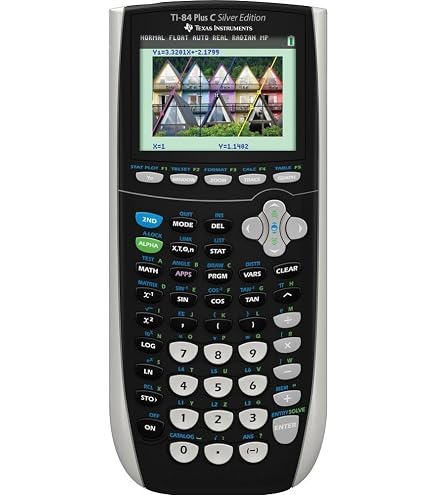
The Texas Instruments TI-84 Plus CE and TI-84 Plus CE CX CAS calculators are useful tools for students, teachers, and anyone working with mathematical calculations. Whether you are preparing for an exam, solving equations in class, or completing assignments at home, a reliable battery helps keep your work on track.
However, if your calculator runs out of power quickly or refuses to charge, it can become difficult to rely on during important tasks. Before deciding to replace the entire calculator, check whether the problem comes from the battery, charging cable, or another component.
The 3.7L1200SPB 1200mAh replacement battery is an option to consider for compatible TI-84 Plus CE calculator models. Understanding the common signs of battery failure can help you decide whether a replacement is necessary.
Why Does the TI-84 Plus CE Battery Drain Quickly?
A calculator that once lasted through several study sessions may eventually need more frequent charging. Several factors can contribute to shorter battery life.
Battery aging
Rechargeable batteries gradually lose capacity after repeated charging cycles. As the battery ages, it may store less energy than it did when new. This can result in shorter operating time even when the calculator appears to charge normally.
Frequent calculator use
Students who use their TI-84 Plus CE throughout the school day may notice battery limitations sooner. Working with graphs, equations, tables, and other functions for extended periods can increase power consumption.
Display brightness and usage habits
Frequent use of a bright display and extended operating sessions can increase energy consumption. Adjusting the display settings when appropriate and turning off the calculator when it is not needed can help manage power usage.
Incomplete charging
If the calculator does not receive a full charge because of a faulty cable, unsuitable power source, or battery problem, it may run out of power sooner than expected.
If your calculator repeatedly loses power during normal use, check its charging behavior and battery condition before purchasing replacement parts.
What to Do When the TI-84 Plus CE Will Not Charge
A TI-84 Plus CE that does not charge may have a battery problem, but the battery is not always the cause.
Start by checking the USB charging cable and power source. Make sure the connections are secure and inspect the cable for visible damage. Try a compatible power source and charging cable that meet the calculator manufacturer’s requirements.
Next, check whether the charging indicator responds when the calculator is connected. If there is no response, the cable, charging port, battery, or internal charging circuitry may require further inspection.
If the calculator charges but loses power soon afterward, the battery may have deteriorated and may no longer retain sufficient capacity.
Avoid repeatedly attempting to charge a damaged battery. If you notice swelling, leakage, unusual heat, or other signs of physical damage, stop using the device and follow the manufacturer’s safety instructions.
How to Tell Whether the TI-84 Plus CE Battery Is Damaged
Several symptoms can help you determine whether the battery may need replacement.
1. The calculator runs out of power quickly
If a fully charged calculator lasts significantly less time than it used to under similar conditions, battery capacity may have declined.
2. The battery does not appear to charge
If the charging indicator does not respond after you have checked the cable and power source, there may be a problem with the battery or charging system.
3. The calculator shuts down unexpectedly
Unexpected shutdowns during calculations or graphing may indicate insufficient battery power. However, other hardware issues can cause similar symptoms.
4. Charging does not improve operating time
If the calculator appears to charge normally but still cannot last through an ordinary study session, the battery may no longer hold enough energy.
5. The battery shows physical damage
Swelling, leakage, or other visible damage should never be ignored. Stop using the device and arrange appropriate inspection or replacement.
These signs can help narrow down the problem, but they do not prove that the battery is the only faulty component. If checking the cable and power source does not resolve the issue, further inspection may be necessary.
Choosing a 3.7L1200SPB 1200mAh Replacement Battery
When the original battery no longer provides dependable operating time, replacing it may be a practical alternative to purchasing another calculator.
The 3.7L1200SPB 1200mAh replacement battery is listed for the Texas Instruments TI-84 Plus CE CX CAS calculator series. Before ordering, verify the exact calculator model and compare the replacement battery’s voltage, dimensions, connector, and configuration with the original battery.
Do not choose a replacement based on capacity alone. Physical fit and electrical compatibility are also important.
Follow the manufacturer’s battery replacement instructions and use suitable tools if the battery is user-replaceable. If you are unsure how to access the battery compartment or disconnect the battery safely, seek assistance from a qualified technician.
A compatible replacement may help restore more dependable operating time when the original battery has deteriorated. However, if the charging port or internal charging circuitry is faulty, installing another battery may not resolve the problem.
Everyday Situations Where Reliable Battery Life Matters
During exams and test preparation
A calculator with dependable battery performance helps students focus on calculations rather than worrying about unexpected shutdowns. Checking the charge before an exam can help avoid unnecessary interruptions.
In mathematics and science classes
Students often use graphing calculators to study functions, equations, statistics, and scientific concepts. Reliable power makes it easier to move between classroom activities without frequent charging breaks.
While completing homework
Extended study sessions may involve repeated calculations, graphing exercises, and reviewing class materials. A battery that holds its charge can make these sessions more convenient.
For teachers and tutors
Teachers and tutors may use graphing calculators to demonstrate mathematical concepts and explain problem-solving methods. Unexpected power loss can interrupt a lesson or tutoring session.
For studying away from home
Students who study in libraries, classrooms, or study spaces may not always have convenient access to a charging outlet. Checking battery condition before leaving home helps reduce the risk of running out of power.
In all these situations, a well-functioning battery supports more consistent calculator use.
Frequently Asked Questions
How long should a TI-84 Plus CE battery last?
Operating time depends on battery condition, display settings, usage frequency, and charging habits. If the calculator needs charging much more frequently than before, check the battery and charging equipment.
Why does my TI-84 Plus CE turn off even after charging?
Possible causes include a deteriorated battery, an incomplete charge, a faulty charging connection, or an internal hardware problem. Check the charging cable and power source before assuming the battery has failed.
Can replacing the battery fix a TI-84 Plus CE that will not charge?
It may help if the battery is defective. However, if the problem comes from the charging port, cable, or internal charging circuitry, a battery replacement alone may not solve it.
Is the 3.7L1200SPB 1200mAh battery compatible with the TI-84 Plus CE CX CAS?
It is listed as a replacement battery for the specified calculator series. Confirm the exact model and battery specifications before purchasing, because similar calculator models may use different components.
Should I replace the battery if it drains quickly?
First check whether the calculator is charging properly and whether the cable and power source work as expected. If the battery continues to provide much shorter operating time, replacement may be appropriate.
A TI-84 Plus CE calculator that drains its battery quickly, fails to charge, or shuts down unexpectedly can interrupt studying, teaching, and everyday calculations. Checking the charging cable, power source, and battery condition helps identify the likely cause before you purchase replacement parts.
If the original battery has lost capacity, the 3.7L1200SPB 1200mAh replacement battery is an option to consider for compatible Texas Instruments TI-84 Plus CE CX CAS models. Verify compatibility before ordering to help restore dependable calculator performance when you need it most.