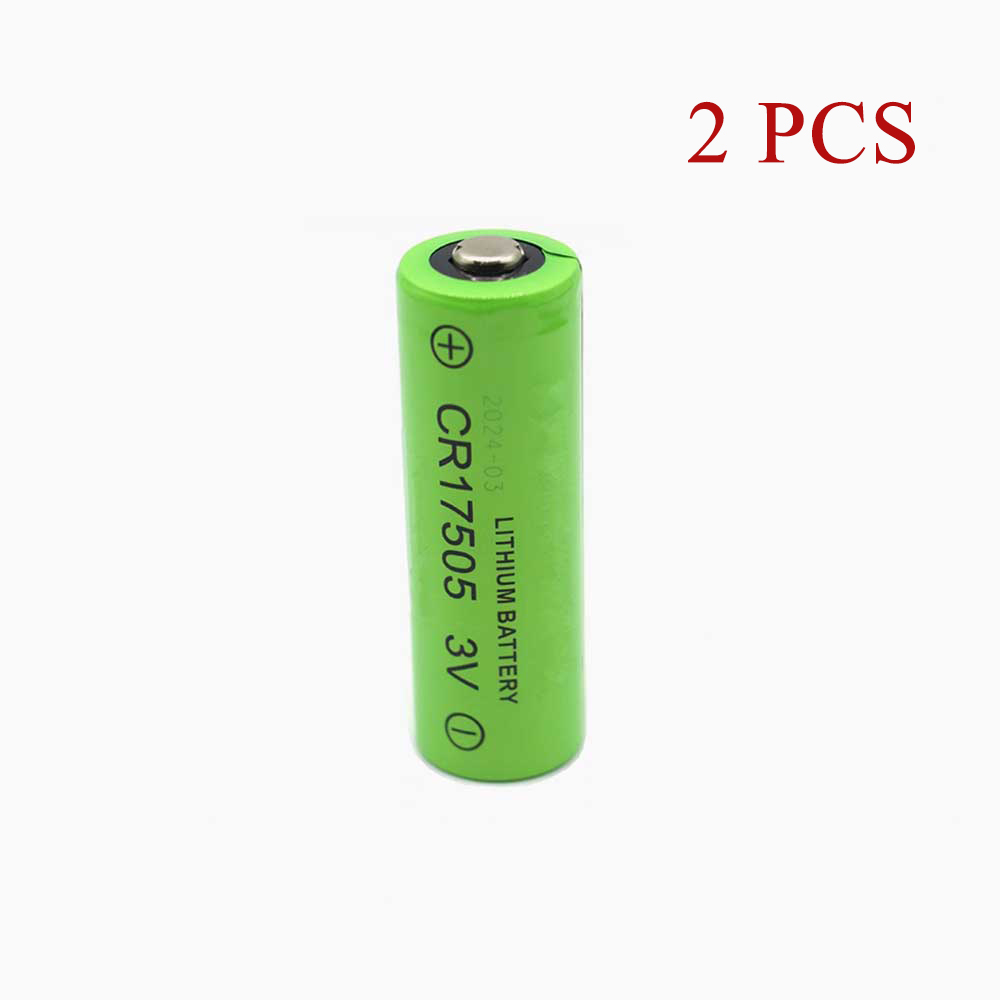
Walk into any facility running smart water meters, gas meters, remote-reading flow meters, or PLC-based industrial control panels, and you’ll eventually hear the same complaint: the equipment was working perfectly, then one morning it simply stopped reporting. Nine times out of ten, the device didn’t fail — its CR17505 battery did.
The CR17505 2800mAh is a compact 3V lithium cell that quietly powers a huge share of modern utility and industrial hardware. It’s small (roughly 51.5mm × 16.8mm), unglamorous, and easy to forget about — until a meter goes dark and a technician has to be dispatched. This article explains why these batteries wear out, why a “dead” CR17505 sometimes just won’t charge, how to tell a failing cell from a healthy one, and where these cells are used across real-world deployments.
What the CR17505 Battery Actually Powers
The CR17505 has become a workhorse across utility and industrial applications because it pairs a high, stable 3V output with an extremely low self-discharge rate and a wide operating temperature range. You’ll find it in:
- Smart IC-card and remote-reading water meters
- Gas meters and flow meters
- PLC (programmable logic controller) industrial control equipment
- Smoke and gas detectors / alarms
- GPS trackers and positioning devices
- Memory backup and clock circuits in industrial instruments
- Medical and security devices
The Huiderui CR17505 — and its regional variants such as the XH2.0-A, XH2.54-A, XH2.54-B, and SM-B connector versions — is a common fitment in these devices. That connector variation matters: always confirm the interface and part number before ordering, because a “CR17505” alone doesn’t guarantee a drop-in match.
Why Your CR17505 Battery Life Feels Too Short
If a cell that used to last years now seems to fade in months, the cause is usually one of these:
1. Natural capacity fade from cycling. Rechargeable lithium CR17505 packs are typically rated for 500–1,000 charge/discharge cycles. Every cycle shaves a little capacity. In equipment that reports or cycles frequently, a pack can drop well below its rated 2800mAh long before you’d expect.
2. A mismatched or worn charger. If the charging circuit stops reaching full voltage, the cell tops out at 70–80% and gives you a fraction of the runtime. This is one of the most under-diagnosed causes of “short” battery life.
3. High-temperature stress. Heat is the single biggest enemy of lithium chemistry. Control panels and meter housings that sit in direct sun or poorly ventilated cabinets age their batteries far faster than the datasheet suggests.
4. Poor storage and dormancy. A cell left dormant for a long period, or stored at a very low state of charge, can lose usable capacity permanently. Batteries want to be used — at least once every few weeks.
5. Deep discharge. Repeatedly draining the battery to empty accelerates wear. Partial discharges are gentler than full ones.
How to get more life out of a CR17505
- Recharge before reaching 10–20%, not at zero.
- Avoid extreme temperatures — keep equipment ventilated and out of direct sun.
- Store spares at roughly 40% charge in a cool, dry place.
- Exercise dormant batteries — run a cycle at least once a month.
- Calibrate when readings go wrong — a full charge, full discharge, then full recharge often restores accurate level reporting.
Why a CR17505 Battery Won’t Charge
A battery that refuses to charge is frustrating, but the cause is usually identifiable. Work through these from simplest to most complex:
| Symptom | Likely cause | What to do |
| No charging at all, level stuck at 0% | Deep-discharged cell in protection mode | Leave on charge 15–30 minutes to “wake” it |
| Charges, then dies almost immediately | Capacity fade / worn cell | Replace the battery |
| Intermittent charging | Dirty, oxidized, or loose contacts | Clean and reseat the connector |
| Charge indicator wrong, won’t accept charge | Control circuit in power-save lock | Remove and reinsert the battery to reset the CPU |
| Won’t hold charge in any device | Cell failure | Order a replacement CR17505 |
| Physical swelling, leakage, corrosion | Internal damage | Stop using immediately; replace |
The “reinsert to reset” fix. On many PLC and metering devices, when the current capacity reads low, the CPU drops into a power-saving state and the battery appears unable to charge. Simply removing the battery and refitting it wakes the CPU, and the battery then charges normally. It sounds trivial; it resolves a surprising number of “won’t charge” tickets.
How to Tell If Your CR17505 Battery Is Actually Dead
Before you spend time on the device or the charger, confirm the battery itself is the problem. These are the reliable warning signs:
- Runtime is far below normal — the device drains dramatically faster than it used to.
- It never reaches a full charge, even after a long, undisturbed charging period.
- It loses power shortly after disconnecting from the charger.
- Battery level jumps around erratically, or fails at 20–30%.
- You’re relying on the charger to keep the device running at all.
- The device reports a battery error or “needs repair” status.
- Physical symptoms: overheating, swelling, leakage, corrosion, or signs of water exposure. Any of these means replace it now — don’t attempt to keep using it.
The swap test. If you have a known-good CR17505, fit it in the same device. If the device runs normally, the original cell was the fault. If the problem persists with a fresh battery, the issue lies with the device or its charging circuit — not the battery.
A compatibility check while you’re at it. Match three things before ordering: the part number (CR17505), the voltage (3V), and the connector type of your specific variant — XH2.0-A, XH2.54-A, XH2.54-B, SM-B, and so on. Same-size cells with different connectors are not interchangeable.
Choosing a Quality CR17505 Replacement
A replacement CR17505 should meet or exceed the original specification, not merely look similar. Look for:
- Correct capacity and voltage — 2800mAh / 3V (or ~8.4Wh) matches the common Huiderui spec.
- Compatible part number and connector — verify against your device’s model code.
- Grade-A lithium cells with no memory effect.
- Built-in protection — over-charge, over-discharge, over-current, over-voltage, and short-circuit protection.
- Recognized certifications — CE, RoHS, and where applicable UL, FCC, and ISO 9001/9002.
- A solid warranty — a 12-month warranty with a 30-day return window is standard on quality replacements.
A well-made replacement restores the device to its original behavior at a fraction of the cost of an OEM-only part — and keeps your meters, panels, and sensors online without interruption.
Field Notes: Where Reliable CR17505 Power Matters Most
- Utility metering fleets. A single dead cell can take a water or gas meter offline, triggering manual reads and angry service calls. Proactive battery replacement on a fleet schedule is far cheaper than emergency dispatch.
- PLC and industrial control panels. These run continuously and often sit in hot cabinets. Battery health directly affects uptime of the entire line.
- Safety and alarm systems. Smoke and gas detectors depend on their cell. A faded battery can mean a silent failure — the worst kind.
- Tracking and remote telemetry. GPS and remote-reading devices in remote locations are expensive to visit. Use a battery you trust, and replace it before it fails.
- Medical and security equipment. Mission-critical devices leave no room for unpredictable power.
A short-lived CR17505, a battery that won’t charge, and a genuinely dead cell are three different problems with three different fixes. Diagnose from the outside in — connector and contacts, then charging circuit, then the battery itself — and you’ll resolve most issues without ever replacing an entire device.
When the battery really is finished, a 2800mAh, 3V CR17505 replacement with the correct connector, genuine safety protection, and proper certification is the simplest, most cost-effective way to bring your Huiderui-powered equipment back to full reliability.
How do I know which CR17505 fits my device? Check the part number on the old battery (CR17505), the voltage (3V), and the connector type — XH2.0, XH2.54, SM-B, etc. All three must match.
Why won’t my CR17505 charge? Common causes: a deep-discharged cell needing a 15–30 minute wake-up charge, dirty contacts, a power-save lock (fixed by removing and reinserting the battery), or a genuinely failed cell.
Can I charge a CR17505 primary (non-rechargeable) cell? No. Primary lithium cells must never be charged. Confirm whether your device uses a rechargeable pack or a primary cell before charging.
How long should a CR17505 battery last? Rechargeable packs typically handle 500–1,000 cycles depending on use, load, and temperature. If runtime drops sharply, replace it.
Is it safe to buy a third-party CR17505 replacement? Yes, provided it matches the original specification, includes built-in protection circuits, and carries recognized certifications (CE, RoHS, UL).